Terraform AWS EKS Provisioning
terraform fmt -checkOverview
Section titled “Overview”EKS Terraform project with Kubernetes deployment templates.
What You Will Build
Section titled “What You Will Build”Architecture Diagram
Section titled “Architecture Diagram”Prerequisites
Section titled “Prerequisites”- Install or review: Terraform, EKS, Kubernetes, AWS.
- Use your own cloud account credentials and keep them out of commits.
- This project expects cloud resources, so verify budget alerts and cleanup first.
- Open the safety guide before running commands that create infrastructure.
Credentials And Cost Warning
Section titled “Credentials And Cost Warning”Cost risk is high. Cloud target: AWS. Cloud credentials needed: Yes. Always use your own account, never commit secrets, and confirm cleanup before creating paid infrastructure.
Step-By-Step Lab
Section titled “Step-By-Step Lab”Use this flow before you run commands:
- Read the cost and credential warning above.
- Review the validation, troubleshooting, cleanup, and portfolio proof sections below.
- Follow the original project guide preserved near the bottom of this page.
- Return to the validation and cleanup checks before you capture portfolio evidence.
Validation Checks
Section titled “Validation Checks”Run the project validation command before and after meaningful changes:
terraform fmt -checkTroubleshooting
Section titled “Troubleshooting”- Run
terraform fmt -checkfirst so local tooling issues are visible early. - If a command fails, check tool versions, working directory, and required environment variables.
- For cloud failures, confirm account identity, region, quotas, and least-privilege IAM.
Cleanup
Section titled “Cleanup”Cleanup is available or expected for this lab. Use the cleanup or destroy steps in the guide below, then confirm that local clusters, containers, cloud resources, buckets, state files, and CI secrets are no longer active.
Portfolio Proof
Section titled “Portfolio Proof”- Validation command output:
terraform fmt -check - Screenshot or terminal proof: Plan/apply evidence plus destroy proof
- Notes explaining what changed, what failed, and how you fixed it
- Cleanup evidence, especially for cloud or Kubernetes resources
Original Project Guide
Section titled “Original Project Guide”The original README content is preserved here for lab-specific commands and context. Headings are intentionally demoted so the page outline stays focused on the standard lab flow.
𝘈𝘶𝘵𝘰𝘮𝘢𝘵𝘦 𝘗𝘳𝘰𝘷𝘪𝘴𝘪𝘰𝘯𝘪𝘯𝘨 𝘰𝘧 𝘒𝘶𝘣𝘦𝘳𝘯𝘦𝘵𝘦𝘴 𝘊𝘭𝘶𝘴𝘵𝘦𝘳𝘴 𝘰𝘯 𝘈𝘞𝘚 𝘸𝘪𝘵𝘩 𝘛𝘦𝘳𝘳𝘢𝘧𝘰𝘳𝘮🛡️ 2026 DevSecOps Enhancements (What You Will Learn)
Section titled “🛡️ 2026 DevSecOps Enhancements (What You Will Learn)”This repository contains raw Terraform code for EKS provisioning. In a 2026 DevSecOps context, raw IaC execution is prohibited without the following guardrails:
- IaC Static Analysis: Before
terraform applyis ever run, the code must be scanned by tools like tfsec, kics, or checkov within the CI pipeline to ensure the EKS cluster isn’t provisioned with public API endpoints or unencrypted EBS volumes. - OpenTofu Migration: Due to Terraform’s licensing changes, 2026 DevSecOps standards heavily favor OpenTofu as the open-source, drop-in replacement for Terraform to maintain vendor neutrality and community-driven governance.
Architectural Design
Section titled “Architectural Design”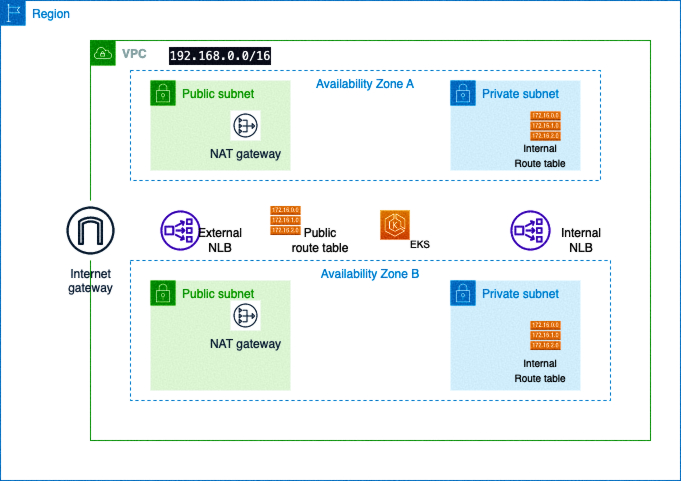
For a text-based architecture diagram, deploy/destroy workflow, security notes, run validation, tagging guidance, and cost controls, see docs/portfolio-runbook.md.
Deploy Notes
Section titled “Deploy Notes”The public EKS API allow list is controlled by cluster_endpoint_public_access_cidrs. The default is the documentation CIDR 203.0.113.0/24; replace it with your current operator/admin IP before planning:
cp terraform.tfvars.example terraform.tfvarsterraform plan -var-file=terraform.tfvarsThe Kubernetes sample no longer stores database passwords directly in deployment.yaml. Create a real secret from the template before applying the workload:
cp db-secret.template.yaml db-secret.yaml#### edit db-secret.yaml locally, then:kubectl apply -f db-secret.yamlkubectl apply -f deployment.yaml -f service.yamlThe deployment includes HTTP/TCP probes, resource requests/limits, and basic pod/container security contexts. For production, split MySQL into its own StatefulSet or use a managed database; the sidecar-style MySQL container remains here only to keep the tutorial self-contained.
Thanks for watching
Section titled “Thanks for watching”Harshhaa Vardhan Reddy -- Devops EngineerSource Files On GitHub
Section titled “Source Files On GitHub”The full learning flow stays on this page. Open GitHub only when a step asks you to inspect code, fork the lab, or download source assets.