Tetris DevSecOps Kubernetes Pipeline
npm --prefix Tetris-V1 test --if-presentOverview
Section titled “Overview”Tetris apps plus EKS and Jenkins Terraform assets.
What You Will Build
Section titled “What You Will Build”Architecture Diagram
Section titled “Architecture Diagram”Prerequisites
Section titled “Prerequisites”- Install or review: Node.js, Docker, Kubernetes, Terraform, Jenkins, AWS.
- Use your own cloud account credentials and keep them out of commits.
- This project expects cloud resources, so verify budget alerts and cleanup first.
- Open the safety guide before running commands that create infrastructure.
Credentials And Cost Warning
Section titled “Credentials And Cost Warning”Cost risk is high. Cloud target: AWS. Cloud credentials needed: Yes. Always use your own account, never commit secrets, and confirm cleanup before creating paid infrastructure.
Step-By-Step Lab
Section titled “Step-By-Step Lab”Use this flow before you run commands:
- Read the cost and credential warning above.
- Review the validation, troubleshooting, cleanup, and portfolio proof sections below.
- Follow the original project guide preserved near the bottom of this page.
- Return to the validation and cleanup checks before you capture portfolio evidence.
Validation Checks
Section titled “Validation Checks”Run the project validation command before and after meaningful changes:
npm --prefix Tetris-V1 test --if-presentTroubleshooting
Section titled “Troubleshooting”- Run
npm --prefix Tetris-V1 test --if-presentfirst so local tooling issues are visible early. - If a command fails, check tool versions, working directory, and required environment variables.
- For cloud failures, confirm account identity, region, quotas, and least-privilege IAM.
- For pipeline failures, check repository secrets, runner permissions, and pinned action versions.
Cleanup
Section titled “Cleanup”No dedicated cleanup command was detected in the project README. Treat this as a warning: before provisioning anything, write down the exact delete, destroy, or rollback steps for your environment.
Portfolio Proof
Section titled “Portfolio Proof”- Validation command output:
npm --prefix Tetris-V1 test --if-present - Screenshot or terminal proof: Passing pipeline run plus scan/deploy evidence
- Notes explaining what changed, what failed, and how you fixed it
- Cleanup evidence, especially for cloud or Kubernetes resources
Original Project Guide
Section titled “Original Project Guide”The original README content is preserved here for lab-specific commands and context. Headings are intentionally demoted so the page outline stays focused on the standard lab flow.
<div class="external-image-reference"> <strong>External image reference</strong> <a href="https://img.shields.io/badge/Connect%20with%20me%20on-LinkedIn-blue.svg" target="_blank" rel="noopener noreferrer">LinkedIn</a> </div> <div class="external-image-reference"> <strong>External image reference</strong> <a href="https://img.shields.io/github/stars/AmanPathak-DevOps.svg?style=social" target="_blank" rel="noopener noreferrer">GitHub</a> </div>
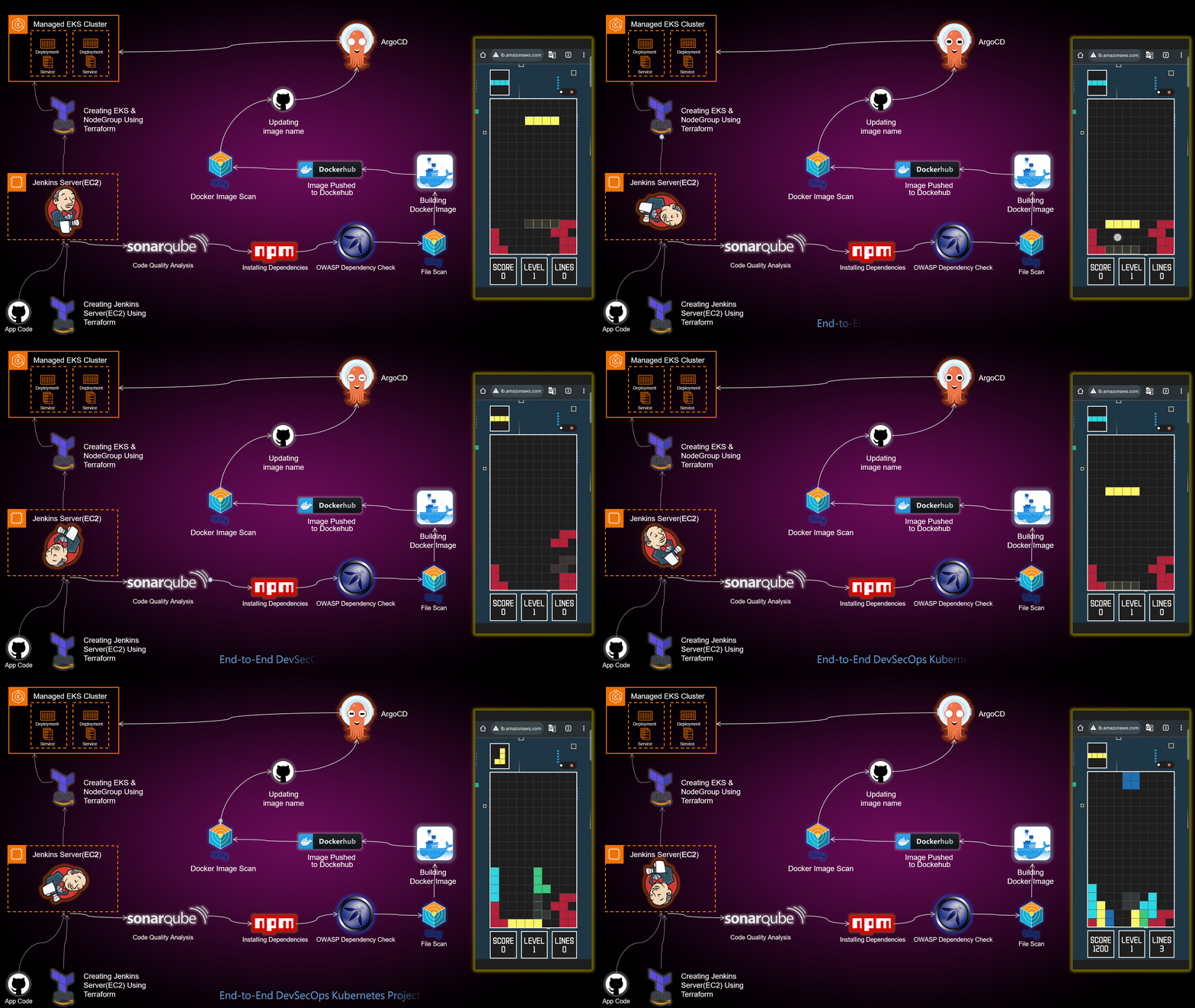
Welcome to an immersive DevSecOps learning experience! This project guides you through deploying a Tetris game on AWS EKS while mastering the art of DevSecOps.
🛡️ 2026 DevSecOps Enhancements (What You Will Learn)
Section titled “🛡️ 2026 DevSecOps Enhancements (What You Will Learn)”This repository’s architecture showcases a mature DevSecOps pipeline deployed to EKS:
- Supply Chain Security: We integrate OWASP Dependency-Check into the CI pipeline to actively scan and block deployments that rely on compromised or vulnerable open-source libraries.
- Zero-Trust GitOps Delivery: By employing ArgoCD, the deployment model shifts from “push” (where Jenkins holds cluster admin credentials) to “pull”. ArgoCD securely syncs state directly from inside the EKS cluster boundary, drastically reducing the external attack surface.
Directories 📂
Section titled “Directories 📂”- EKS-TF: Explore Terraform scripts for deploying EKS clusters on AWS.
- Jenkins-Pipeline-Code: Jenkins pipeline code for automated CI/CD.
- Jenkins-Server-TF: Terraform scripts for provisioning Jenkins servers on AWS EC2.
- Manifest-file: Kubernetes manifest files for Tetris application deployment.
- Tetris-V1: Initial version of the Tetris game application.
- Tetris-V2: Enhanced version of the Tetris game application.
Getting Started 🚀
Section titled “Getting Started 🚀”-
Clone the Repository:
Terminal window git clone <a href="https://github.com/DevCloudNinjas/DevOps-Projects.git" target="_blank" rel="noopener noreferrer">GitHub source link</a> -
Explore the Directories: Navigate into each directory to find detailed scripts, pipelines, and configurations.
-
Follow the Blog: Implementation details and insights are documented in the associated blog post.
Tools Explored 🛠️
Section titled “Tools Explored 🛠️”- Jenkins: Automated CI/CD pipelines
- ArgoCD: Continuous deployment to Kubernetes
- Kubernetes: Orchestration for containerized applications
- Trivy: Container vulnerability scanner
- OWASP Dependency-Check: Ensuring secure dependencies
- Docker: Containerized application deployment
- SonarQube: Unveiling code quality insights
- Terraform: Infrastructure as Code for AWS EKS
Blog Implementation 📝
Section titled “Blog Implementation 📝”To implement this project, follow the step-by-step guide in our detailed blog post. Learn how each tool plays a crucial role in achieving DevSecOps excellence.
Acknowledgments 🙌
Section titled “Acknowledgments 🙌”Special thanks to the open-source community and the contributors who make learning and collaboration an incredible journey.
License 📄
Section titled “License 📄”This project is licensed under the Apache-2.0 license see the LICENSE file for details.
Source Files On GitHub
Section titled “Source Files On GitHub”The full learning flow stays on this page. Open GitHub only when a step asks you to inspect code, fork the lab, or download source assets.