Azure DevOps Journey with AKS and Terraform
test -f README.mdOverview
Section titled “Overview”Multi-lab Azure DevOps and AKS walkthrough.
What You Will Build
Section titled “What You Will Build”Architecture Diagram
Section titled “Architecture Diagram”Prerequisites
Section titled “Prerequisites”- Install or review: Azure DevOps, AKS, Terraform, .NET, Azure.
- Use your own cloud account credentials and keep them out of commits.
- This project expects cloud resources, so verify budget alerts and cleanup first.
- Open the safety guide before running commands that create infrastructure.
Credentials And Cost Warning
Section titled “Credentials And Cost Warning”Cost risk is high. Cloud target: AZURE. Cloud credentials needed: Yes. Always use your own account, never commit secrets, and confirm cleanup before creating paid infrastructure.
Step-By-Step Lab
Section titled “Step-By-Step Lab”Use this flow before you run commands:
- Read the cost and credential warning above.
- Review the validation, troubleshooting, cleanup, and portfolio proof sections below.
- Follow the original project guide preserved near the bottom of this page.
- Return to the validation and cleanup checks before you capture portfolio evidence.
Validation Checks
Section titled “Validation Checks”Run the project validation command before and after meaningful changes:
test -f README.mdTroubleshooting
Section titled “Troubleshooting”- Run
test -f README.mdfirst so local tooling issues are visible early. - If a command fails, check tool versions, working directory, and required environment variables.
- For cloud failures, confirm account identity, region, quotas, and least-privilege IAM.
- For pipeline failures, check repository secrets, runner permissions, and pinned action versions.
Cleanup
Section titled “Cleanup”No dedicated cleanup command was detected in the project README. Treat this as a warning: before provisioning anything, write down the exact delete, destroy, or rollback steps for your environment.
Portfolio Proof
Section titled “Portfolio Proof”- Validation command output:
test -f README.md - Screenshot or terminal proof: Passing pipeline run plus scan/deploy evidence
- Notes explaining what changed, what failed, and how you fixed it
- Cleanup evidence, especially for cloud or Kubernetes resources
Original Project Guide
Section titled “Original Project Guide”The original README content is preserved here for lab-specific commands and context. Headings are intentionally demoted so the page outline stays focused on the standard lab flow.
This tutorial/lab setup is going to take you through a DevOps journey using Azure DevOps. From setting up your pipeline to deploying an application to your Azure Kubernetes cluster!
What you will learn
Section titled “What you will learn”In this tutorial/lab, you will learn:
- Initial setup of Azure DevOps to begin deploying to Azure using Pipelines as code
- Deploy Azure resources using Terraform modules
- Deploy a test application to Azure Kubernetes Service
- An understanding of CI/CD with automated application deployments
- Test your deployed Azure resources using automated testing
- Reviewing monitoring and alerting using Application & Container Insights
🛡️ 2026 DevSecOps Enhancements (What You Will Learn)
Section titled “🛡️ 2026 DevSecOps Enhancements (What You Will Learn)”This repository has been upgraded to model 2026 Cloud Security protocols. While progressing through the labs, note the following architectural improvements:
- Unprivileged AKS Deployments: Our Kubernetes manifests no longer run applications as
root. We actively drop all unnecessary kernel capabilities to restrict blast radius during a potential container breakout. - Terraform Cloud Backends: Legacy local state files or basic storage accounts have been migrated to utilize secure, encrypted, and locked remote Terraform backends to prevent state corruption across CI/CD runners.
- Automated Infrastructure Scanning: The pipeline is pre-configured to easily adopt
tfsec/checkovsteps before applying the Azure infrastructure.
This setup is based on a somewhat “real-life” scenario and setup mirrors an example of a real-world setup!
Tutorial/labs format
Section titled “Tutorial/labs format”Prior to starting the tutorial/labs - please review the below Prerequisites
Labs are found here, complete each one in number sequence 1…2…3…etc
-
Initial Setup starts you off with setting up:
-
- Azure DevOps Organisation Setup
- Azure DevOps Project Creation
- Azure Service Principal Creation
-
- Create Blob Storage location for Terraform State file
-
Create Azure AD Group for AKS Admins
- Create Azure AD AKS Admin Group
-
-
Setup Azure DevOps Pipeline The purpose of this lab is to create all of the Azure cloud services you’ll need from an environment/infrastructure perspective to run the test application.
- Pipeline setup
- Setup Azure DevOps Pipeline
- Pipeline setup
-
Deploy Application to Azure Container Registry Deploy sample Application to Container Registry.
- Deploy Application to Azure Container Registry
- Build the Docker Image Locally
- Run The Docker Image Locally
- Deploy sample Application to Container Registry
- Deploy Application to Azure Container Registry
-
Deploy Application to Azure Kubernetes Cluster
-
- Terraform to add role assignment for AKS managed identity to access the deployed ACR
-
Add Application Insights to Terraform
- Application Insights will be used to monitor the application once deployed!
-
Add Azure Key Vault to Terraform
- Azure Key Vault will be used to store secrets used within your Azure DevOps Variable Group.
-
Update Pipeline to Deploy Application to AKS
- Update Pipeline to Deploy asp Application to AKS
-
-
-
Introducing CI/CD to your pipeline
- Begin CI/CD with Pipeline Trigger for automatic pipeline runs
-
Automated deployment of your AKS Application
- In previous labs; the application was initially manually setup for its build tag. In CI/CD, this would be automated and the Application on the AKS cluster would update each time the pipeline has been ran.
-
-
Testing your deployed Azure Infrastructure
-
Testing Infrastructure using Inspec
- Using Inspec-Azure to test your Azure Resources
-
Inspec Testing using Azure DevOps Pipeline
- Run Inspec-Tests using Azure DevOps
- View Inspec reports in Azure DevOps
-
-
-
- Using Application Insights to view telemetry data!
-
Azure Application Insights Availability Tests
- Configure availability test using Application Insights
-
Log Analytics Container Insights
- Reviewing Log Analytics Container Insights
-
You will learn how to setup and configure a pipeline that involves CI/CD
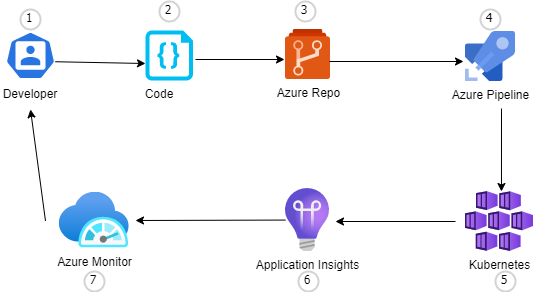
- Developer changes application source code.
- Application is committed to the source code repository in Azure Repos.
- Continuous integration triggers application build
- Continuous deployment within Azure Pipelines triggers an automated deployment with environment-specific configuration values.
- Updated Application is deployed to environment specific Kubernetes cluster
- Application Insights collects and analyzes health, performance, and usage data.
- Azure Monitor collects and analyzes health, performance, and usage data.
Thank you
Section titled “Thank you”Thank you for taking the time to work on this tutorial/labs. Let me know what you thought!
Ensure to follow me on GitHub. Please star/share this repository!
Source Files On GitHub
Section titled “Source Files On GitHub”The full learning flow stays on this page. Open GitHub only when a step asks you to inspect code, fork the lab, or download source assets.